Recently, my main interest seems to shift from photography to blog modification. I've been hanging out with my roommate Waz and all we talked about is blog mod. I've modified my About feature (button) so when we click it, it displays About information in the same page without redirecting to a different page but since it's not an obvious thing because I used the expand/collapse code with a few modification to enable the fading fx I didn't have a post about it. With this post, I'm blogging about a new mod which I called "label chart". It displays barchart for labels according to numbers of posts that have been tagged with. This idea is not my original idea though. I was amazed by this idea where they increase the font sizes of tags (called Label in blogger) depends on their popularities. First I saw this on Flickr I thought I was cool and thought I would make my own someday but then yesterday Waz introduced me to this post, it shows how to create that feature, which the author calls it Label Cloud. Just after that, I learned his code and without copied his code right away, I knew how to use <b:loop> tag in blogger markup language. Instead of making the same thing, I was looking for a different to represent the popularities of labels and then I thought of barchart and because it has been used for years for presentation of summary of numerical data thus most people are familiar with it. Finally, I made it with a few added lines of code. Even though I don't use the same presentation as used in Label Cloud, I still admire the idea.
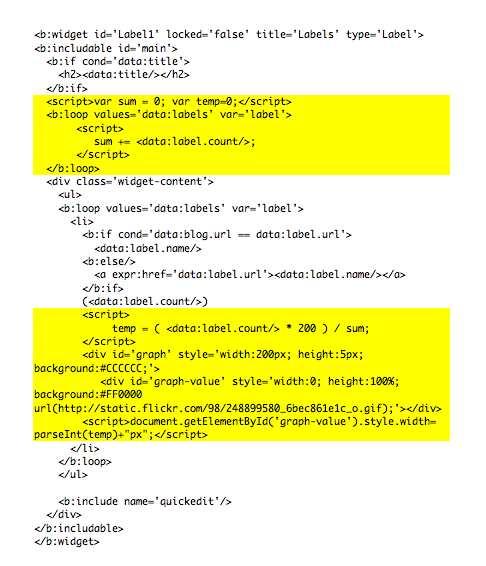
Below is the code. The added lines are highlighted with yellow color. Click it to enlarge.

Continue reading...


 Click on the image