


Disable Annoying Firefox Tooltips
 [Update: I've moved to a space now (http://phalkunz.com/). Please post your comment on my new blog. This post on my new blog is at http://phalkunz.com/2006/10/30/disable-annoying-firefox-tooltips/]
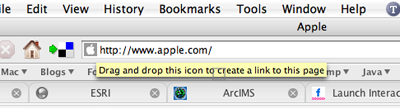
Drag-and-Drop is the beauty of the GUI but sometimes other thing gets in the way that makes it useless. The most annoying drag-and-drop I have ever come across is when I try to drag the address of a website (by dragging the icon) from the firefox address box and place it on the bookmark toolbar folder but before I drop it in the folder a tooltip with a message "drag and drop this icon to create a link to this page". It sounds good, right? The folder I wanna place a bookmark is under that tooltip. After I drop the link and I check the folder the link it's not even there because that tooltip block it from going in. I was like grrrrrrr. I think this happens to mac version only. But lucky enough, firefox provides a way to turn it off. Go type "about:config" in the address box and hit the enter. It shows a list of configurable feature, find "browser.chrome.toolbar_tips" item and double-click to turn it value to false. That's set.
[Update: I've moved to a space now (http://phalkunz.com/). Please post your comment on my new blog. This post on my new blog is at http://phalkunz.com/2006/10/30/disable-annoying-firefox-tooltips/]
Continue reading...


